How to Post on Instagram From Your PC or Desktop
Instagram has never made it important to help users upload images from their computers, but that doesn’t mean it is impossible. We’ve got an awesome and completely safe idea that will help you to upload content from your computer.
Step 1:
First, go to https://www.instagram.com/, for your reference finds below screenshot.

Step 2:
Then login to the Instagram account.

Step 3:
After login, the Instagram then right click on any place. Then click on Inspect Element. After that click on the mobile view for your reference check below Screenshots.
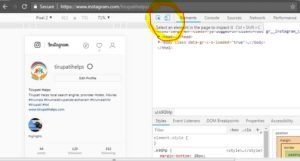
please select your mobile model.

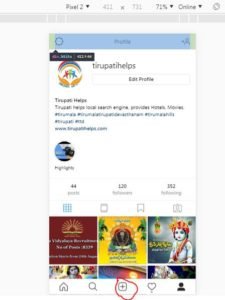
After clicking on Ctrl+F5. Refresh the URL. now it's Mobile view.
Tirupati Tourism & Travel Guide : +91-9985998480
Self Drive Car Rental in Tirupati
Car Rental Tirupati
Was this guide helpful?
Share it with someone planning their yatra, or tell us what to add.